

オンライン診療
Online Medical Consultation

学校や自宅からスマホで診察
Online consultations from school or home using your smartphone
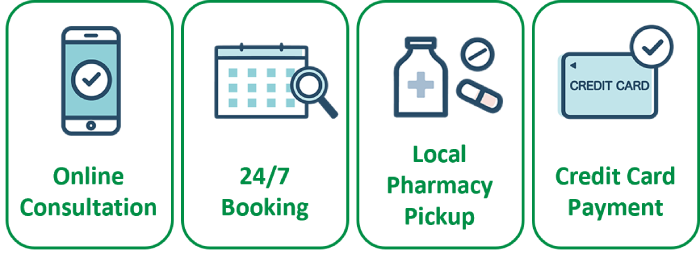
Japanese, English and French
Do you already have an account?
Click HERE to go directly to our web appointment page.
診療科目
Medical Services
▮ 内科一般
General Internal Medicine
風邪、腹痛、アレルギー、生活習慣病、紹介状作成など。
日本にお住まいで、日本の健康保険証をお持ちの方が対象です。
Please feel free to consult us for common colds, stomach aches, allergies, or any other health concerns.
This is available to those who reside in Japan and have a domestic insurance card.
ご予約の流れ
Step of Online Medical Consultation
▮ ご用意いただくもの
What you need
- スマートフォン
- マイナンバーカード または 資格確認書(健康保険証)
- パスポート または 在留カード
- お薬手帳または 服用中の薬
- クレジットカード
- (お持ちの場合)紹介状、健康診断結果
- Smartphone
- My Number Card or Health Insurance Eligibility Certificate
- Passport or Residence Card (Zairyu Card)
- Medication record book (Okusuri Techo) or current medications
- Credit card for payment
- A referral letter, health checkup results (if available)
▮ 事前準備
Preparation
① 「マイナアプリ」をダウンロード
マイナ保険証の登録に必要です。
Download the “Myna App” for health insurance card registration
②「オンライン診療システム curon」の準備
Set Up the Online Medical Consultation System “curon”
ご利用になりたい言語で、「アプリ版」「Web版」を選択します。
Choose“App”or“Web”in your preferred language.
▮ 日本語 (Japanese)の方
アプリ版 curon をダウンロード

▮ 多言語 (Multilingual)の方
「curon web版 をご利用ください
For other languages, please use the “curon web version.”
- Please use Chrome as your browser.
- You can use Google Translate to display the page in multiple languages.
【重要】Web版をご利用の方も、マイナアプリは事前に必ずダウンロードしてください。
Even if you are using the web version, please make sure to download the Myna App in advance.
▮ 予約から薬の受取りまで
Step for Online Medical Consultation
|
STEP1
新規登録
New Registration |
 |
|---|

|
STEP2
予約
Appointment |
 |
|---|
Online Consultation Hours
Wed – Fri: 15:00 – 18:00
Sat: 15:00 – 17:00
Sun: 12:00 – 13:00
【重要】来院受診と同様に、保険証は受診のたびに確認が必要です。マイナ保険証(または資格確認書)は、同月内でもその都度登録してください。
手続きは「curon」と「マイナアプリ」を行き来しながら行います。手続きが終わるまで両方の画面を閉じないでください。
As with in-person visits, your insurance must be verified each time. Please register your My Number Health Insurance Card (or Eligibility Verification Certificate) at each visit, even within the same month.
The process involves switching between “curon” and the “Myna app.” Please do not close either screen until the process is complete.
もちづき内科クリニック
クロン施設コード
Clinic Code
1 4 8 8
|
STEP3
ビデオ通話で診察
Join the Video Consultation |
 |
|---|
オンライン診療では、診察料とは別にシステム利用料 330円(税込)がかかります。
An additional system usage fee of JPY 330 applies to online consultations.
|
STEP4
カード決済
Payment by credit card |
 |
|---|
診療後、診療代等やシステム利用料はクレジットカードより自動決済されます。※薬代は別途
After your consultation, the consultation fee and system usage fee will be automatically charged to your credit card. *Medication costs are not included.
|
STEP5
薬局で薬の受取り
Picking up medication |
 |
|---|
よくあるご質問 FAQ
| 日本の健康保険証をお持ちの方で、風邪や発熱、花粉症のようなアレルギーなど、初期診療が対象です。紹介状の作成も行っています。 胸痛、呼吸困難、強い腹痛、大量出血、高熱が続く場合などは、来院による対面診療もしくはすぐに119に連絡してください。 Available for patients covered by Japanese health insurance seeking initial medical care for conditions such as colds, fever, and allergies (including hay fever). Referral letters can also be provided upon request. If you have chest pain, difficulty breathing, severe abdominal pain, heavy bleeding, or a persistent high fever, please visit the clinic in person or call 119 (Japan’s emergency number) immediately in an emergency. |
| 診察料とは別に、システム利用料330円(税込)がかかります。 また薬代も別となります。薬代は薬局にてお支払いください。 A system usage fee of 330 yen (tax included) will be charged separately from the consultation fee. Please note that medication costs are also separate and should be paid at the pharmacy. |
| はい。日本の健康保険をご利用の方なら受診できます。 当院の医師は、日本語・英語・フランス語で対応できます。 Yes. Patients covered by Japan's health insurance system can use our online consultation service. Our doctor can provide consultations in Japanese, English, and French. |
| 症状によりますが、通常5〜15分程度です。 The consultation usually takes 5 to 15 minutes, depending on your condition. |
| 予約時間を過ぎた場合は、診察順が変更となることがあります。 大幅に遅れる場合は、お早めに当院までご連絡ください。 If you arrive late, your appointment order may be changed. If you expect to be significantly late, please contact our clinic as soon as possible. |
| 再接続をお試しください。 接続できない場合は、当院よりお電話にてご連絡いたします。 Please try reconnecting first. If the connection cannot be restored, we will contact you by phone. |
| 診察後、当院より患者様ご指定の薬局へ処方箋をFAXします。 ご指定の薬局で薬をお受け取りください。 After your consultation, we will fax your prescription to the pharmacy of your choice. Please collect your medication from that pharmacy. |
| マイナポータルアプリをダウンロードできない場合、いくつかの原因が考えられます。以下をご確認ください。 ① お使いの端末がアプリに対応しているかをご確認ください。 (対応端末一覧) https://www.jpki.go.jp/prepare/pdf/nfclist.pdf ② インターネット接続をご確認ください。 インターネット接続が不安定な場合、アプリをダウンロードできないことがあります。以下をご確認ください。
③ スマートフォンの空き容量をご確認ください。 アプリのサイズは約 16.1MB です。スマートフォンの空き容量が不足している場合、アプリをインストールできないことがあります。必要に応じて、不要なファイルやアプリを削除し、空き容量を確保してください。 (空き容量の確認方法)
④ その他、マイナポータルアプリをダウンロードできない主な原因 Android(Google Play)
iPhone(App Store)
(国/地域設定の確認方法) 設定 → Apple Account → メディアと購入 → アカウントを表示 → 国または地域 If you are unable to download the Mynaportal app, there may be several possible causes. Please check the following: ① Check whether your device is compatible with the app. Please refer to the list of supported devices: https://www.jpki.go.jp/prepare/pdf/nfclist.pdf ② Check your internet connection. If your internet connection is unstable, you may not be able to download the app. Please check whether:
③ Check your device storage. The app size is approximately 16.1 MB. If your smartphone does not have enough free storage space, you may not be able to install the app. If necessary, delete unnecessary files or apps to free up storage space. Please check your available storage:
④ Other common reasons why the Mynaportal app cannot be downloaded Android (Google Play)
iPhone (App Store)
To check your country/region setting: Settings → Apple Account → Media & Purchases → View Account → Country/Region |
| マイナポータルアプリが正常に起動しない場合は、以下をお試しください。 ① アプリを再インストールし、端末を再起動してください。 一度インストール済みのアプリをアンインストールしてから、再度インストールしてください。再インストール後に端末を再起動すると、問題が解決する場合があります。 ② ブラウザ、OS、アプリのバージョンをご確認ください。 ブラウザ、OS(オペレーティングシステム)、アプリが最新の状態になっているか確認し、公式のダウンロードリンクから最新版を取得してください。 ③ 端末に標準搭載されているブラウザをご利用ください。 お使いの端末にあらかじめインストールされている標準ブラウザの使用をおすすめします。 ④ PCで利用する場合は、ICカードリーダーが必要です。 PCでマイナンバーカードを読み取るには、ICカードリーダライタが別途必要です。 スマートフォンでのご利用をおすすめします。 If the Mynaportal app does not open properly, please try the following: ① Reinstall the app and restart your device. Uninstall the installed app first, then reinstall it. Restarting your device after reinstalling may resolve the issue. ② Check your browser, OS, and app versions. Please check that your browser, operating system (OS), and app are up to date, and download the latest version from the official download link. ③ Use the device’s default browser. We recommend using the browser that comes pre-installed on your device. ④ Use of a PC requires an additional card reader. To read your My Number Card on a PC, a separate IC card reader/writer is required.We recommend using a smartphone instead. |
| マイナポータル公式サポートページをご参照ください。 Please refer to the official support page. https://img.myna.go.jp/manual/sitemap.html |
| 図解による操作手順を、以下のページにてご案内しております。 The following page provides illustrated step-by-step instructions. https://mochizuki-medical.co.jp/online2 |
| マイナ保険証の代わりに、資格確認書でも受診できます。 curonより資格証明に関する画像をアップロードしてください。 マイナ保険証の画像はアップロードしないようご注意ください。 くわしいやり方はこちらの「資格確認書で登録」からご覧いただけます。 You may use your Eligibility Confirmation Certificate instead. Please upload an image of your eligibility documentation to curon. Do not upload your My Number Health Insurance Card. You can find detailed instructions here. (Register using a Certificate of Eligibility) |
Do you already have an account?
Click HERE to go directly to our web appointment page.
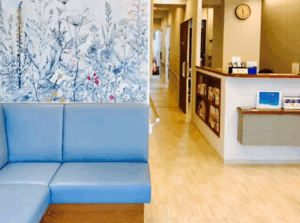 もちづき内科クリニックは、戸越公園駅より徒歩約3分、品川区にある内科・アレルギー科のクリニックとして、女性医師が丁寧な診療を行っております。
休日診療にも対応し、一般保険診療からNMN点滴などの自由診療まで幅広くご相談いただけます。重症花粉症・アレルギー性鼻炎に対するゾレア®(オマリズマブ)注射治療にも対応しており、症状がつらい方にも新たな治療選択肢をご提供しています。
また、性感染症(STD)検査にも対応しており、プライバシーに配慮した環境で安心して検査を受けていただけます。土日の雇入時健康診断も受け付けております。